 You Eat
 How to keep a useful photo food diary
Keep a photo food diary with recognisable meals, clear dates and short notes. See a real example and learn what a meal photo can leave out.
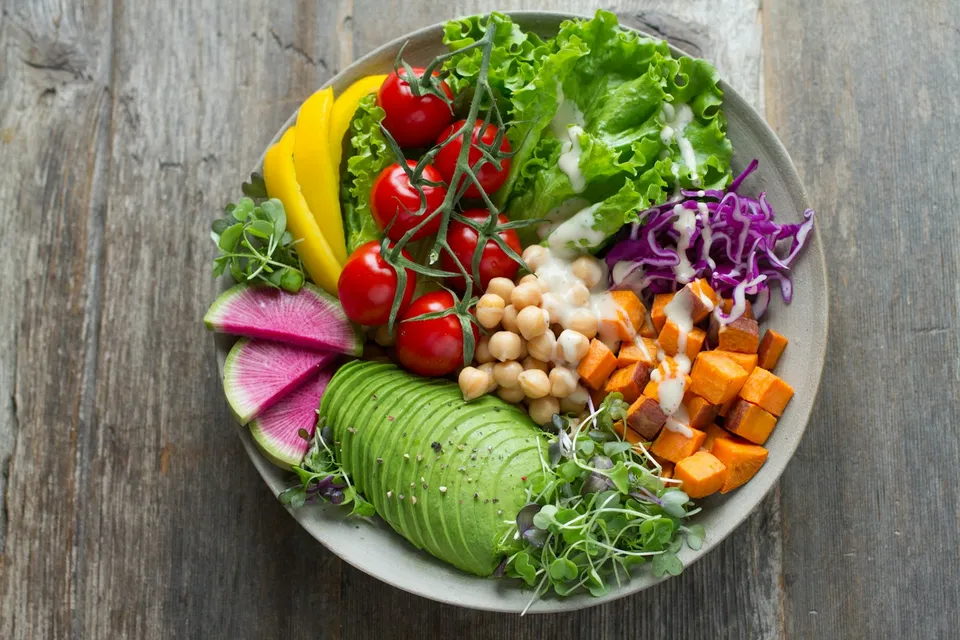
A useful photo food diary makes it easy to recognise what you ate and find the meal again. Photograph the meal clearly, keep its date with it, and add a few words for anything the picture leaves out. The photo does not need to look like a restaurant advert.
Make the meal easy to see
Use the light available and try to keep the main meal in the frame. If several plates belong to different people, a brief note can explain which one was yours. A clear view helps you recognise the meal later; it does not make nutrition estimates exact.
The salad shown here is an example photograph already used in You Eat’s app demonstration. It contains visible chickpeas, avocado, tomatoes and sweet potato. Its prepared labels illustrate selected foods rather than every ingredient or dressing.
Add the things a photo cannot tell you
A picture might not show what is inside a sandwich, which milk went into a drink or whether a sauce was served separately. A short description helps:
Lunch: chickpea and avocado salad, with sweet potato and tomatoes. Dressing already added.
That is a meal description, not a nutritional measurement. If you do not know an ingredient, do not turn a guess into a fact just to make the entry look complete.
Check an app’s reading before saving
In You Eat, a photo is a starting point. Check the recognised foods and everyday portion estimates, change anything that needs changing, then save the meal.
The same app also accepts typed descriptions, spoken descriptions and barcode entries. It is fine to use words for one meal and a photo for another. These options belong to the same meal record.
Keep the date and a recognisable name
A camera roll can become difficult to search. Meal names and dates make the record easier to use. “Lunch salad” may be enough for a quick note; “chickpea and avocado salad” is more distinctive when you want to find or repeat it.
A missing photo does not need to mean a missing entry. Write the meal down if that suits the moment. If you forgot the entry altogether, keep the gap visible rather than assuming the diary covers the whole day.
Know where your photos go
Before choosing an app, check whether meal photos stay on your device, are uploaded for recognition, and can be deleted. These are different things.
You Eat removes location data before upload. Meal photos are retained for 30 days by default, with a delete-on-confirm option. The draft privacy notice explains the current commitments. These product settings do not establish what another photo-journaling app does.
You Eat is coming soon to iPhone. Explore how its photo food diary works or use the free weekly paper log while you choose a format.